


Institute of Formal and Applied Linguistics
Charles University, Czech Republic
Faculty of Mathematics and Physics
NPFL099 – Statistical Dialogue Systems
This is the new course for the '26/27 Fall semester. You can find slides from last year on the archived old page.
About
This course presents advanced problems and current state-of-the-art in the field of dialogue systems, chatbots, and voice assistants. After a brief introduction into the topic, the course will focus mainly on the application of machine learning to the task – especially deep learning/neural networks – in the individual components of the traditional dialogue system architecture as well as in end-to-end approaches: chatbots represented by a single neural network, including large language models (LLMs).
This course is a follow-up to the course NPFL123 Dialogue Systems, but can be taken independently – important basics will be repeated. All required deep learning concepts will be explained, but only briefly, so some machine learning background is recommended.
Logistics
News
- 15/11: I've added a small vibecoded Q-learning demo to clarify the last lecture. I was wrong about some things during the lecture (Q values stay bounded, Q2-ASK goes to 1), I'm sorry for the confusion.
- 11/11: A tiny bug was fixed in the HW repo, concerning imports from non-root directories. Please update your repo from upstream.
- 22/10: Starting today, the labs will take place in the room S5 on the 2nd floor (we were moved due to outreach events in the building).
- 1/10: We'll have just the lecture (no lab session) next week, 8 Oct. The labs will start two weeks later with a joined 1st&2nd session (which should roughly fit the time).
- 17/9: The website has been updated for the 2026/2027 winter semester run.
Language
The course is taught in English, but we're happy to explain in Czech, too.
Time & Place
Lectures and labs take place at Malá Strana
- Lectures: Thu 14:00, room S10, 1st floor
- Labs: Thu 15:40, room S5, 2nd floor (every other week, starts on 22 October)
The labs will be likely shorter than 45 mins, as they mainly consist of explaining homework assignments and discussing related questions.
In addition, we will stream both lectures and lab instruction over Zoom and make the recordings available as MP4 and on Youtube (under a private link, sent to enrolled students at the start of the semester & upon request). Note that these will be raw unedited recordings provided on a best-effort basis, so quality is not guaranteed.
- Zoom meeting ID: 953 7826 3918
- Password is the SIS code of this course (capitalized)
We'll also send out links to a Discord workspace for discussing assignments and getting news about the course.
If you can't access Zoom or Discord (after the semester starts), please email Ondrej.
Passing the course
To pass this course, you will need to take an exam and do lab homeworks, which will involve working with neural dialogue systems. See more details here. Note that the assignments will be the most challenging part of the course, and will take some time to complete.
Topics covered
- Brief machine learning basics
- neural networks architectures
- training techniques
- pretrained language models
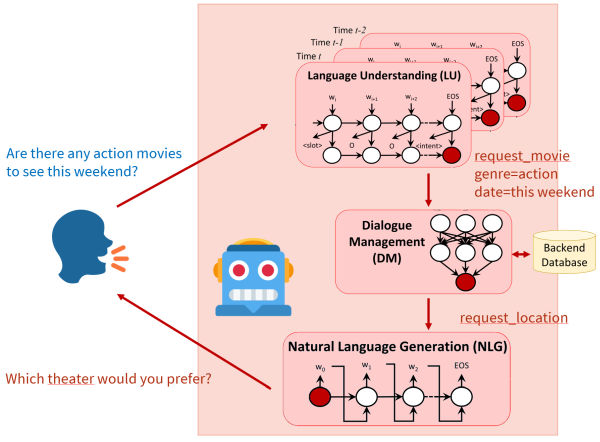
- Brief introduction into dialogue systems
- dialogue systems applications
- basic components of dialogue systems
- knowledge representation in dialogue systems
- data and evaluation
- Language understanding (NLU)
- semantic representation of utterances
- statistical methods for NLU
- Dialogue management
- dialogue representation as a (Partially Observable) Markov Decision Process
- dialogue state tracking
- action selection
- reinforcement learning
- user simulation
- deep reinforcement learning (using neural networks)
- Response generation (NLG)
- introduction to NLG, basic methods (templates)
- generation using neural networks
- End-to-end dialogue systems (one network to handle everything)
- sequence-to-sequence systems
- memory/attention-based systems
- pretrained language models
- Open-domain systems (chatbots)
- generative systems (RNN-based, Transformer, pretrained language models)
- information retrieval
- ensemble systems
- Multimodal systems
- component-based and end-to-end systems
- image classification
- visual dialogue
Lectures
PDFs with lecture slides will appear here shortly before each lecture (more details on each lecture are on a separate tab). You can also check out last year's lecture slides.
1. Introduction Slides Questions
2. Data & Evaluation Slides Questions
3. Neural Nets Basics Slides Questions
4. Training Neural Nets Slides Dataset Exploration MultiWOZ 2.2 Loader Questions
5. Natural Language Understanding Slides Questions
6. Dialogue Management (1) Slides Prompting an LLM for responses on MultiWOZ Questions
7. Dialogue Management (2) Slides Questions
Literature
A list of recommended literature is on a separate tab.
Lectures
1. Introduction
- What are dialogue systems
- Common usage areas
- Task-oriented vs. non-task oriented systems
- Closed domain, multi-domain, open domain
- System vs. user initiative in dialogue
- Standard dialogue systems components
- Research forefront
- TTS audio examples: formant, concatenative, HMMs, neural
2. Data & Evaluation
- Types of dialogue datasets
- Dataset splits
- Intrinsic vs. extrinsic evaluation
- Objective vs. subjective evaluation
- Evaluation metrics for dialogue components
3. Neural Nets Basics
- machine learning as function approximation
- machine learning problems (classification, regression, structured prediction)
- input features (embeddings)
- network shapes -- feed forward, CNNs, RNNs, attention, Transformer
4. Training Neural Nets
22 October Slides Dataset Exploration MultiWOZ 2.2 Loader Questions
- supervised training: gradient descent, backpropagation, cost
- learning rate, schedules & optimizers
- self-supervised: autoencoding, language modelling
- pretraining, finetuning, prompting
- unsupervised: GANs, clustering
- reinforcement learning (short intro), RLHF
5. Natural Language Understanding
- problems of NLU
- common meaning representations -- intents + slots
- delexicalization, simple approaches
- neural approaches to NLU (network shapes & training tasks)
- joint intent & slot models
- pretrained/large language models
- less supervision
6. Dialogue Management (1)
5 November Slides Prompting an LLM for responses on MultiWOZ Questions
- dialogue state tracking & action selection/policy
- dialogue state, belief state
- static & dynamic trackers, various approaches
- introduction to policies
- reinforcement learning, user simulator
7. Dialogue Management (2)
- reinforcement learning, value function
- actor, critic, actor-critic
- on-policy & off-policy
- Deep Q Networks -- Q learning demo
- Policy gradient methods (REINFORCE, Actor-critic)
- learned rewards
- hierarchical RL
Homework Assignments
There will be 6 homework assignments + 2 bonuses, each for a maximum of 10 points. Please see details on grading and deadlines on a separate tab.
Assignments should be submitted via Git – see instructions on a separate tab.
All deadlines are 23:59:59 CET/CEST.
Note: If you don't have a faculty Gitlab account yet, please create one as soon as possible (see the instructions). Don't wait until the deadline! It takes 5 minutes, and if you don't do it, you won't have any way of submitting.
Index
3. Prompting an LLM for responses on MultiWOZ
1. Dataset Exploration
Presented: 22 October, Deadline: 10 November
Task
Your task is to select one dialogue dataset, download and explore it.
- Find out (and mention in your report):
- The name of the dataset
- What kind of data it is (domain, modality)
- Where you downloaded it from (include the original URL)
- How it was collected
- What kind of dialogue system or dialogue system component it's designed for
- What kind of annotation is present (if any at all), how was it obtained (human/automatic)
- What format is it stored in
- What is the license
Here you can use the dataset description/paper that came out with the data. The papers are linked from the dataset webpages or from here. If you can't find a paper, ask us and we'll try to help. If you can't find some of the information in the paper, mention this in your report.
- Measure (and enter into your report):
- Total data length (in terms of dialogues, turns, sentences, words; separately for user/system)
- Mean/std dev dialogue lengths (in terms of dialogues, turns, sentences, words; separately for user/system)
- Vocabulary size (separate for user/system)
- Shannon entropy over words in User/system turns (see slide 21 in Lecture 2)
Here you should use your own programming skills. If your dataset has a train/dev/test split, use the training set. If there's no clear separation between a user and a system (e.g. human-human chitchat data, or NLU-only data), provide just the overall numbers.
- Have a closer look at the data and try to make an impression -- does the data look natural? How difficult do you think this dataset will be to learn from? How usable will it be in an actual system? Do you think there's some kind of problem or limitation with the data? Write a short paragraph about this in your report.
Things to submit:
- A short summary detailing all of your findings (basic info, measurement, impressions) in Markdown as
hw1/README.md. - Your code for analyzing the data as
hw1/analysis.pyorhw1/analysis.ipynb.
See the submission instructions here (clone your Gitlab repo and add a new merge request).
Datasets to select from
Primarily one of these:
- Diverse 0-shot Tracking (https://github.com/emorynlp/Diverse0ShotTracking)
- DailyDialog (https://huggingface.co/datasets/roskoN/dailydialog)
- Schema-Guided Dialogue (https://github.com/google-research-datasets/dstc8-schema-guided-dialogue)
- CrossWOZ (https://github.com/thu-coai/CrossWOZ)
- Clinc-OOS (https://github.com/clinc/oos-eval)
- ConvBank (https://gitlab.com/ucdavisnlp/dialog-parsing)
- Multi3WOZ (https://github.com/cambridgeltl/multi3woz)
- MetaLWOz/DSTC8 (https://www.microsoft.com/en-us/research/project/metalwoz/)
- PersonaChat (https://github.com/facebookresearch/ParlAI/tree/main/parlai/tasks/personachat, direct download link here, use the
train_none_originaldata) - Wizard of Wikipedia (https://parl.ai/projects/wizard_of_wikipedia/)
Others:
- AirDialogue (https://github.com/google/airdialogue)
- Edina Self-dialogue (https://github.com/jfainberg/self_dialogue_corpus)
- Empathetic Dialogues (https://github.com/facebookresearch/EmpatheticDialogues)
- FB Semantic Parsing for Dialogue (https://www.aclweb.org/anthology/D18-1300/, http://fb.me/semanticparsingdialog)
- FB multilingual (https://arxiv.org/pdf/1810.13327.pdf, https://fb.me/multilingual_task_oriented_data)
- GraphWOZ (https://arxiv.org/abs/2211.12852, https://github.com/ntwalker/GraphWOZ)
- Holl-E (https://github.com/nikitacs16/Holl-E)
- HR-MultiWOZ (https://github.com/amazon-science/hr-multiwoz-tod-llm-agent)
- HWU NLU Evaluation data (https://github.com/xliuhw/NLU-Evaluation-Data)
- KG-Copy Data (https://github.com/SmartDataAnalytics/KG-Copy_Network, the
datasubdirectory) - MS Dialogue Challenge Data (https://github.com/xiul-msr/e2e_dialog_challenge)
- Mimic & Rephrase (https://www.aclweb.org/anthology/K19-1037, https://github.com/square/MimicAndRephrase/)
- PolyAI Task-specific – Banking (https://github.com/PolyAI-LDN/task-specific-datasets)
- PolyAI Task-specific – Span Extraction (https://github.com/PolyAI-LDN/task-specific-datasets)
- SPOLIN improv data (https://github.com/wise-east/spolin)
- Snips (https://github.com/snipsco/nlu-benchmark/tree/master/2017-06-custom-intent-engines)
- Taskmaster-1 (https://ai.google/tools/datasets/taskmaster-1)
- Taskmaster-2 (https://research.google/tools/datasets/taskmaster-2/)
- Topical Chat (https://github.com/alexa/Topical-Chat)
- Ubuntu Dialogue (https://github.com/rkadlec/ubuntu-ranking-dataset-creator)
Further links
Dataset surveys (broader, but shallower than what we're aiming at):
- https://breakend.github.io/DialogDatasets/
- https://github.com/AtmaHou/Task-Oriented-Dialogue-Dataset-Survey
2. MultiWOZ 2.2 Loader
Presented: 22 October, Deadline: 18 November
Task
Your task is to create a component that will load the task-oriented MultiWOZ 2.2 dataset and process the data so it is prepared for model training. The component will consist of two Python classes -- one to hold the data, and one to prepare the training batches.
In later assignments, you will build an LLM based model (a prompted one similar to this one and a finetuned one similar to SOLOIST) using the data provided by this loader. Note that this means that the next assignments depend on this one.
We prepared some code templates for you to guide your implementation. You should not need to modify the code already present in the templates. If you need to (e.g. you find a bug), you can do so, but please comment on your code changes in the MR. Do not change the code in any major way -- using the provided code is part of the assignment.
The bits that are waiting for your implementation are highlighted with # TODO: in diallama/mw_loader.py,
diallama/generate.py
and hw2/test.py.
Note that to use the provided code, you'll need to install the dependencies provided in the requirements.txt. They can be installed easily via pip install -r requirements.txt.
Data background
MultiWOZ 2.2 is a task-oriented conversational dataset labeled with dialogue acts. It contains around 10k conversations between the user and a Cambridge town info centre (system). The dialogues are about certain topics: restaurants, hotels, trains, taxi, tourist attractions, hospital, and police. You can find more details in the dataset repository.
You can write your own dataset loader from the original format (see the dataset) but we recommend using the version preprocessed for Huggingface datasets.
This is how the data looks like if you load it using Huggingface Datasets: Each entry in the dataset represents one dialog. The information we are interested in is contained in the field turns, which is a dictionary with the following important keys:
speaker: Role associated with the speaker. It's either 0 (user) or 1 (system).utterance: String representation of the dialogue utterances.dialogue_acts: Structured parse of the system utterances into dialog acts (only in system utterances). It contains slot names and correspondingspan_info(location of the slot in the utterance, which will come in handy later).frames: Present only in user utterances. Structured representation of the user's belief state.
Each of these keys is mapped to a list with labels for the corresponding turns.
The dataset contains the train, validation and test splits. Please respect them! Also note that MultiWOZ contains a database (and you need database queries for your system to work correctly), but we'll address that later.
Dataset class
You need to implement the following properties for the Dataset class inside diallama/mw_loader.py:
- It loads the data and process it into individual training examples (containing contexts & system responses so far; we'll skip dialogue states and the database for now).
- Note that we are modelling only system responses, so each training example should correspond to one system response. User utterances should not be treated as response, they're only part of the context.
- Each loaded example is a dictionary of the folowing structure:
{ 'context': list[str], # list of utterances preceeding the current system utterance/response 'utterance': str, # the string with the current system utterance/response 'delex_utterance': str, # the string with the current response which is delexicalized, i.e. slot values are # replaced by corresponding slot names in the text. } - Each dialogue of
nturns will yieldn // 2examples, each with progressively longer context (starting from a context of length 1, up ton-1turns of context). - It distinguishes between data splits, i.e. it can be parameterized by split type (train, validation, test).
- It can truncate long contexts to
klast utterances, wherekis a parameter of the class. - It contains delexicalized versions of the utterances (where slot values are replaced with placeholders corresponding to slot names). You can use the data field
dialogue_actsand its fieldsspan_end,span_startfor localizing the parts suitable for delexicalization.
Batch encoding (inside the GenerationWrapper class)
Machine learning models usually work with numbers and matrices. That is why we also need to convert strings in our batches to integer IDs.
Since this will be the same for both prompting and finetuning, we moved the corresponding code to the class that will deal with generation
in either case, i.e. GenerationWrapper in diallama/generate.py
This means that you'll also need to implement a collate function (collate_fn) inside GenerationWrapper that has the following properties:
- It is able to work with batches coming from
torch.utils.data.DataLoader(lists of examples).
- It uses a tokenizer passed in the constructor to split inputs into subword tokens and assign them IDs. Note the tokenizer must be compatible with the model you'll be using.
- It converts the whole batch to a single dictionary (
output) of the following structure:output = { 'response': list[list[int]], # tokenized utterances (list of subword ids from the current dialogue turn) # for all batch examples 'delex_response': list[list[int]], # tokenized and delexicalized utterances (list of subword ids # from the current dialogue turn) for all batch examples }
Test script
The test script is in hw2/test.py in your repo.
Here, we simply test out the code -- load the dataset and print out a few things. Your task here is to load the model and tokenizer.
We want to use the meta-llama/Llama-3.2-1B-Instruct
model, which is just about the right combination of capable enough and small enough to fit onto small GPUs.
Load the model and its tokenizer using Huggingface's auto methods,
i.e., AutoModelForCausalLM.from_pretrained and AutoTokenizer.from_pretrained.
Note that meta-llama/Llama-3.2-1B-Instruct is a gated model. This means you need to set up a Huggingface account and agree to Llama3.2's terms and conditions
on the model page. You can then get an access token under your Huggingface settings.
Just click on Create a new token, then tick Read access to contents of all public gated repos you can access, give it some name (anything) and click Create token.
Make sure you save the token. Whenever you create a model or tokenizer, make sure you pass token=<your access token> in your code.
If you don't feel comfortable agreeing to Llama terms and conditions, feel free to use Qwen/Qwen2.5-0.5B-Instruct instead,
or ask Ondrej and he'll lend you his access token.
If you find another sub-1B model that looks good enough to use, please tell Ondrej.
Things to submit:
- Your dataset class implementations inside
diallama/mw_loader.py. - Your collation function implementations inside
diallama/generate.py. - Your model & tokenizer loading inside
hw2/test.py. - Output of
hw2/test.pyrun on your data (test set is used by default), ashw2/output.txt. Have a look at what the script is doing, that'll help you with your implementation.
3. Prompting an LLM for responses on MultiWOZ
Presented: 5 November, Deadline: 30 November
In this assignment, you'll need to prompt your model (Llama-3.2-1B-Instruct by default) and ask it to provide replies for various queries relating to hotels. We'll ignore state tracking and database for now, that will come later on. For now, it suffices that the model will give you some reasonable answer, it doesn't necessarily have to be true :-).
To do that, you'll need to implement a bunch of things:
- Finish the collate function and format the prompt properly
- Write the decoding part, using Huggingface's
generate()function - Prepare multiple prompts and multiple generation settings and test them out.
Most of your implementation will be in the GenerationWrapper class,
which deals with all things related to decoding.
Finetuning the model will come later.
Prompt templating -- finishing the collate function
First of all, you need to finish the GenerationWrapper.collate_fn method you started in HW2, to correctly format the whole input prompt for the model. LLMs, especially the instruction tuned ones, use a very specific prompt formatting. You should use your tokenizer's apply_chat_template function for this. It'll handle all the formatting for you. Note that GenerationWrapper has the tokenizer passed in upon creation (see its __init__ method).
The LLM input prompt (for an instruction-tuned LLM which you chat with, like you would with ChatGPT) has multiple parts:
- Your chat with the LLM always uses a system prompt at the beginning, telling the LLM what its general role is (“You are an assitant...”).
- In our case, the whole chat will basically just consist of a single turn, where you supply the response prompt, i.e., instruction to the LLM to provide a response at the given point in the dialogue. This prompt should include the whole dialogue context/history, formatted in some appropriate form (e.g. each turn on a new line, prepended with alternating User: and Assistant:; you know the last one is supposed to be a user turn).
So the whole input prompt will include the system prompt + response prompt relating to the current sentence the system wants to deal with, in the chat template format.
Let your collate_fn method return the whole tokenized prompt. It's a good idea to print it out so you see how it looks like (you might need to do it for debugging anyway).
Since the system prompt and the response prompt are parameters passed to the GenerationWrapper class upon creation, you don't need to care about their exact values here (but you will do that in a second).
Note: You may also want to store the attention mask for the prompt, and pass it to the decoding (see below). It's not strictly necessary now (you'll get some annoying warnings but it'll work), but we'll use this in HW4.
For now, you also don't need to store the attention mask, it'll just be a vector of 1's with the same shape as the vector for the prompt.
Decoding
The second thing you need to implement is the output generation inside the GenerationWrapper.generate_response method. Here, you need to:
- Get your input context formatted as a prompt using the
GenerationWrapper.collate_fnmethod you just finished. - Feed the prompt into your LLM using
self.model.generate()and use theGenerationConfigparameter passed intoGenerationWrapper.generate_response. - When you get the model's output, it'll contain your input prompt as well as the model's output following it. You need to cut off the prompt and return just the next response in the dialogue.
Test script
Now it's time to try out what you coded, using hw3/test.py, where we try out multiple prompts & multiple generation settings. This script needs the actual prompts and generation settings values, so you'll need to fill it in.
- Fill in a system prompt, telling the LLM what role it should play (
SYSTEM_PROMPT). - Fill in at least 3 significantly different variants of the response prompt (
RESPONSE_PROMPTS). You can try out lexicalized vs. delexicalized responses, or different level of detail for the instructions (specifying the response format, what the model can and cannot do, etc.). - Fill in 3 different
GenerationConfigoptions intoGENERATION_CONFIGS. You can have a look at this tutorial, to find out what settings there are and how they differ. In any case, make sure to usemax_new_tokensand set it below 100, so your code doesn't take forever (you don't need longer replies anyway). Note that the way the code is set up, only the first prompt will be used with all settings, the following prompts will only use the first setting. - Fill in the code for loading your model & tokenizer, just like you did in HW2.
Finally, store the outputs of your script as hw3/output.txt. Look how the individual settings differ, and write up a short paragraph in Markdown or plain text in hw3/report.md (5-10 sentences).
We'll look at more rigorous evaluation on the actual dataset later, but this is how you would play with prompting with LLMs anyway.
Note: Running this on your computer's CPU will most likely be annoyingly slow, so you'll want to use a GPU. You can use Google Colab, which provides GPUs for free for a limited time spans, typically enough to run this assignment. You can also get an account on our in-house AIC student computing cluster (Ondrej will get your accounts created and distribute passwords soon). Before you work on AIC, make sure you read the cluster tips! You can prepare and debug your code even without a GPU, then only run the actual generation once you have access to a GPU.
Things to submit
- Your finished collation code (prompt formatting) and generation/decoding code in
diallama/generate.py. - Your prompt and generation settings as well as model loading in
hw3/test.py. - The output of your script in
hw3/output.txt. - Your short commentary on how the models works (or doesn't work) under the different settings, in
hw3/report.md.
Homework Submission Instructions
All homework assignments will be submitted using a Git repository on MFF GitLab.
We provide an easy recipe to set up your repository below:
Creating the repository
- Log into your MFF gitlab account. Your username and password should be the same as in the CAS, see this.
- You'll have a project repository created for you under the teaching/NPFL099/2026 group. The project name will be the same as your CAS username. If you don't see any repository, it might be the first time you've ever logged on to Gitlab. In that case, Ondřej first needs to run a script that creates the repository for you (please let him know on Slack/email). In any case, you can explore everything in the base repository. Your own repo will be derived from this one.
- Clone your repository.
- Change into the cloned directory and run
git remote show origin
You should see these two lines:
* remote origin
  Fetch URL: git@gitlab.mff.cuni.cz:teaching/NPFL099/2026/your_username.git
  Push  URL: git@gitlab.mff.cuni.cz:teaching/NPFL099/2026/your_username.git
- Add the base repository (with our code, for everyone) as your
upstream:
git remote add upstream https://gitlab.mff.cuni.cz/teaching/NPFL099/base.git
- You're all set!
Submitting the homework assignment
- Make sure you're on your master branch
git checkout master
- Checkout new branch:
git checkout -b hwX
-
Solve the assignment :)
-
Add new files (if applicable) and commit your changes:
git add hwX/solution.py
git commit -am "commit message"
- Push to your origin remote repository:
git push origin hwX
-
Create a Merge request in the web interface. Make sure you create the merge request into the master branch in your own forked repository (not into the upstream).
Merge requests -> New merge request

- Wait a bit till we check your solution, then enjoy your points :)!
- Once approved, merge your changes into your master branch – you might need them for further homeworks (but feel free to branch out from the previous homework in your next one if we're too slow with checking).
Updating from the base repository
You'll probably need to update from the upstream base repository every once in a while (most probably before you start implementing each assignment). We'll let you know when we make changes to the base repo.
To upgrade from upstream, do the following:
- Make sure you're on your master branch
git checkout master
- Fetch the changes
git fetch upstream master
- Apply the diff
git merge upstream/master master
Automated Tests
You can run some basic sanity checks for homework assignments -- they are included in your repository
(make sure to upgrade from upstream first).
Note that the tests require stuff from requirements.txt to be installed in your Python environment.
The tests assume checking in the current directory, they assume you have the correct branches set up.
For instance, to check hw1, run:
./run_tests.py hw1
By default, this will just check your local files. If you want to check whether you have
your branches set up correctly, use the --check-git parameter.
Note that this will run git checkout hw1 and git pull, so be sure to save any
local changes beforehand!
Always update from upstream before running tests, we're adding checks for new assignments as we go. Some may only be available at the last minute, we're sorry for that!
AIC Cluster Computation Tips
This is just a short primer for the AIC wiki – better read that one, too. But definitely read at least this text before you start working with AIC.
Login
Use the command
ssh LOGIN@aic.ufal.mff.cuni.cz
where LOGIN is your SIS username.
On the head node
When you log on to AIC, you're at the cluster head node. Do not compute here – this just for launching computation jobs, copying files and such. All of your computation jobs will run on one of the CPU/GPU nodes. (You can run the terminal multiplexing program on the head node.)
Workflow
There are two ways to compute on the cluster:
- submitting a batch script containing the commands you wish to run,
- executing commands in an interactive shell.
You should use a batch script for running longer computations. The interactive shell is useful for debugging.
Batch scripts
Use the sbatch command to submit your jobs (i.e. shell scripts) into a queue. For running a python command, simply create a shell script that has one line – your command with all the parameters
you need.
You can either specify the parameters in the script or on the command line.
Here are two equivalent ways of specifying a GPU job with 2 CPU cores, 1 GPU and 16G system RAM (all GPUs have 16-24G VRAM, enough for what we're doing here):
Using SBATCH directives
- Create a file
job_script.sh:
#!/bin/bash
#SBATCH -J hello_world					  # name of job
#SBATCH -p gpu      					  # name of partition or queue (if not specified default partition is used)
#SBATCH --cpus-per-task=2                 # number of cores/threads per task (default 1)
#SBATCH --gpus=1                          # number of GPUs to request (default 0)
#SBATCH --mem=16G                         # request 16 gigabytes memory (per node, default depends on node)

# here start the actual commands
sleep 5
echo "Hello I am running on cluster!"
- Execute the command:
sbatch job_script.sh
Using command-line parameters
- Create a file
job_script.sh:
#!/bin/bash

sleep 5
echo "Hello I am running on cluster!"
- Execute the command:
sbatch -J hello_world -p gpu -c2 -G1 --mem 16G job_script.sh
Have a look at the AIC wiki or man sbatch for all the command-line parameters.
(Note: long / short flags can be used interchangeably for both approaches.)
Interactive jobs
You can get an interactive console using srun.
The following command will run bash with the same resources as in the previous example:
srun -J hello_world -p gpu -c2 -G1 --mem=16G --pty bash
Important notes
- Always request the resources you'll need! (both for the batch and interactive jobs).
- With interactive jobs, don't forget to
exitthe console after use – you're blocking the GPU and whatever you reserve as long as the console is open! - Don't submit too many jobs at a time (don't overfill the cluster, leave space for others).
- You can't request more than 8 CPU cores or 1 GPUs.
Other commands
- Use
sinfoto list the available queues. - Use
squeue --meorsqueue -u LOGIN(where LOGIN is your username) to check your jobs. - Use
squeueto see every job currently running on the cluster. - Use
scancel JOB_IDto cancel a job.
Tips for efficient development
- terminal multiplexing: byobu (or tmux, screen) allows you to have multiple terminal sessions and keeping everything open even if you lose connection (see a quick primer on byobu).
- SSH connection: mosh is able to reestablish the SSH connection after the connection is interrupted (unstable internet, turning the computer off, etc.).
- file management: you can access the AIC filesystem using SFTP:
sftp://LOGIN@aic.ufal.mff.cuni.cz - development: the SSH plugin for VS Code enables you to code in IDE directly on the cluster.
- Python:
Links
- SLURM tutorial for ÚFAL cluster: https://wiki.ufal.ms.mff.cuni.cz/slurm
- SLURM cheatsheet: https://www.carc.usc.edu/user-information/user-guides/hpc-basics/slurm-cheatsheet
- sbatch manpage: https://manpages.org/sbatch
Exam Question Pool
The exam will have 10 questions from the pool below. Each question counts for 10 points. We reserve the right to make slight alterations or use variants of the same questions. Note that all of them are covered by the lectures, and they cover most of the lecture content. In general, none of them requires you to memorize formulas, but you should know the main ideas and principles. See the Grading tab for details on grading.
Introduction
- What's the difference between task-oriented and non-task-oriented systems?
- Describe the difference between closed-domain, multi-domain, and open-doman systems.
- Describe the difference between user-initiative, mixed-initiative, and system-initiative systems.
- List the main components of a modular task-oriented dialogue system (text/voice-based)
- What is the task (input/output) of speech recognition in a dialogue system?
- What is the task (input/output) of speech synthesis in a dialogue system?
Data & Evaluation
- What are the usual approaches to collecting dialogue data (name at least 2)?
- How does Wizard-of-Oz data collection work?
- What are common annotation types you need for dialogue systems and how can you obtain them?
- What’s the difference between intrinsic and extrinsic evaluation?
- What is the difference between subjective and objective evaluation?
- What are the common options of getting people to evaluate your system?
- What are some evaluation metrics for non-task-oriented systems (chatbots)?
- How would you evaluate NLU (both slots & intents)?
- Explain an NLG evaluation metric of your choice.
- Describe how BLEU works (in principle, exact formulas not needed).
- Why is word-overlap evaluation (such as BLEU) problematic?
- Describe a metric for NLG other than BLEU.
- Show at least 2 examples of subjective (human) evaluation metrics for dialogue systems.
- How can you use an LLM to evaluate dialogue system?
- What is significance testing and what is it good for?
- Assume you have dialogue systems A and B, and A performs better than B in terms of response BLEU on a dataset of 100 dialogues. Describe how you’d test for significance.
- Why do you need to evaluate on a separate test set?
Neural Nets Basics
- What's the difference between classification and regression as a machine learning problem?
- Describe the task of sequence prediction (=autoregressive generation).
- What's the difference between classification and ranking as a machine learning problem?
- What's the difference between sequence labeling and sequence prediction?
- What is an embedding, what units can it relate to, and how can you obtain it?
- What are subwords and why are they useful?
- What's an encoder-decoder model and how does it work?
- How does an attention model work?
- What's the main principle of operation for convolutional networks?
- What's the difference between LSTM/GRU-based and Transformer-based architecture?
- Describe the basics of a Transformer language model.
- What's a pretrained language model?
- Describe the typical architecture of large language models.
Training Neural Nets
- Describe the principle of stochastic gradient descent.
- Why is it important to choose an appropriate learning rate?
- Describe an approach for learning rate adjustment of your choice.
- What is dropout, what is it good for and why does it work?
- What’s a variational autoencoder and how does it differ from a “regular” autoencoder?
- What is masked language modeling?
- How do Generative Adversarial Networks work?
- Describe the principle of the pretraining+finetuning approach.
- How does clustering work?
- What is self-supervised training and why is it useful?
- Describe 2 examples of a self-supervised training task.
- Can you apply a pretrained language model for a new task without finetuning it at all?
- How can you finetune a language model without updating all the parameters?
- What's instruction tuning and what is it good for?
- How are LLMs typically trained, in addition to basic next-word prediction training?
- How does an input into an instruction-tuned “chat” LLM typically look like?
Natural Language Understanding
- Design a (sketch) of an NLU neural architecture that joins intent detection and slot tagging.
- Describe language understanding as classification and language understanding as sequence tagging.
- What is delexicalization and why is it helpful in NLU?
- Describe one of the approaches to slot tagging as sequence tagging.
- What is the IOB/BIO format for slot tagging?
- How can you use pretrained language models (e.g. BERT) for NLU?
- How can you combine rules and neural networks in NLU?
- How can an NLU system deal with noisy ASR output? Propose an example solution.
- What is a copy mechanism/pointer network?
Dialogue State Tracking
- What is the point of dialogue state tracking in a dialogue system?
- What is the difference between dialogue state and belief state?
- What's the difference between a static and a dynamic state tracker?
- What's a partially observable Markov decision process?
- Describe a viable architecture for a belief tracker.
- What is the difference between state trackers as classifiers vs. as candidate rankers?
- Describe the principle of state tracking as span selection.
- Describe a generation-based dialogue state tracker.
Dialogue Policies
- Describe the basic reinforcement learning setup (agent, environment, actions, rewards).
- Map the general reinforcement learning setup to a dialogue system situation.
- Why is reinforcement learning preferred over supervised learning for training dialogue managers?
- What are V and Q functions in a reinforcement learning scenario?
- What's the difference between actor and critic methods in reinforcement learning?
- Describe a Deep Q Network.
- Describe the REINFORCE approach.
- What’s the main principled difference between Deep Q-Networks and Policy Gradient methods?
- What are actor-critic reinforcement learning methods?
- What’s the difference between on-policy and off-policy optimization?
- Why do you typically need a user simulator to train a reinforcement learning dialogue policy?
- Give an example of possible turn-level or dialogue-level rewards for RL optimization.
- What is a user simulator? What are some common approaches to building one?
- How can you use LLM as a tool to help learn a task-oriented policy?
Natural Language Generation
- What are the main steps of a traditional NLG pipeline – describe at least 2.
- Describe a handcrafted approach to NLG.
- What are the main problems with vanilla neural NLG systems (base RNN/Transformer) in dialogue response generation?
- What is delexicalization and why is it helpful in NLG?
- Describe a possible neural approach to NLG with an approach to combat hallucination.
- How can you use pretrained language models or LLMs in NLG?
- What are the typical decoding approaches in neural language model based NLG? Explain & contrast at least 2.
- What can you do with LLMs to reduce hallucinations in NLG?
End-to-end Models
- What are some pros and cons of end-to-end task-oriented models over traditional modular ones?
- Describe an example structure of an end-to-end task-oriented dialogue system.
- Describe the Sequicity (2-step decoding) task-oriented dilaogue model.
- Describe an end-to-end task-oriented model based on pretrained language models.
- How would you adapt a pretrained language model for an end-to-end task-oriented dialogue system?
- How would you use reinforcement learning to train an end-to-end task-oriented model?
- Why is it a bad idea to train end-to-end dialogue systems only with reinforcement learning on word level?
- Describe a viable LLM-based end-to-end task-oriented approach.
- How can you represent dialogue state for end-to-end neural task-oriented models?
Chatbots
- What are the three main approaches to building non-task-oriented chatbots?
- How does the Turing test work? Does it have any weaknesses?
- What are some techniques rule-based chitchat chatbots use to convince their users that they're human-like?
- Describe how a retrieval-based chitchat chatbot works.
- Why is a vanilla seq2seq (RNN/Transformer) architecture for chatbots problematic?
- Describe an example approach to improving diversity or coherence in a seq2seq-based chitchat chatbot.
- How can you use a pretrained language model in a chitchat chatbot?
- Describe a possible architecture of a hybrid/ensemble chitchat chatbot.
- How does retrieval-augmented generation work?
- How can you enforce a consistent personality in an LLM-based chitchat chatbot?
Multimodality
- How does the structure of traditional (modular) multimodal dialogue systems differ from non-multimodal ones?
- Give an example of 3 alternative input modalities (i.e. not voice/text).
- Give an example of 3 alternative output modalities (i.e. not voice/text).
- How would you build a multimodal end-to-end neural dialogue system (e.g. for visual dialogue)?
- Explain some problems that may occur when a dialogue system talks to two people at once.
- What’s the difference between image classification and object detection?
- How would you build a neural end-to-end image-based dialogue system (consider using pretrained components)?
- What is the task of visual dialogue about?
- How do multimodal LLMs deal with image or audio inputs?
Linguistics & Ethics
- What are turn taking cues/hints in a dialogue? Name a few examples.
- What is a barge-in?
- What is grounding in dialogue?
- Give some examples of grounding signals in dialogue.
- What is entrainment/alignment/adaptation in dialogue?
- Describe the overgeneralization/overconfidence problem in data-driven NLP models.
- Describe the demographic bias problem in data-driven NLP models.
- Give an example of a user safety concern in dialogue systems.
- What's the problem with training neural models on private data?
Course Grading
To pass this course, you will need to:
- Take an exam (a written test covering important lecture content).
- Do lab homeworks (implementing an end-to-end dialogue system + other tasks).
Exam test
- There will be a written exam test at the end of tihe semester.
- There will be 10 questions, we expect at least 2-3 sentences as an answer, with a maximum of 10 points per question.
- You may get bonus points for correct and more detailed answers.
- A list of possible exam questions is available on the website.
- To pass the course, you need to get at least 50% of the total points from the test (but 60% overall, see below).
- If needed, there will be exam dates in the summer.
Homework assignments
- There will be 6 homework assignments, introduced every other week, plus some bonus assignments.
- For each assignment, you will get a maximum of 10 points.
- You may get a bonus point for nice code.
- You need to get at least 40 assignment points (>66%) to pass the course, and they count towards your grade (see below).
- You will submit the homework assignments into your private Gitlab repository.
- All assignments will have a fixed deadline (typically 2-3 weeks).
- You can ask for a deadline extension if you have a good reason, such as illness.
- If you submit the assignment after the deadline, you will get:
- up to 50% of the maximum points if it is less than 2 weeks after the deadline;
- 0 points if it is more than 2 weeks after the deadline.
- Any bonus points you get will not be lowered.
- Note that most assignments depend on each other! That means that if you miss a deadline, you still might need to do an assignment without points in order to score on later assignments.
- Once we check the submitted assignments, you will see the points you got and the comments from us on Gitlab, in a comment on your merge request.
- Please bear with us for the checking, it's harder than it looks.
- If your unsure about your total points, feel free to ask.
- You can take the exam even if you don't reach 40 homework assignment points, but you need to get at least 40 points to get the final grade.
Grading
The final grade for the course will be a combination of your exam score and your homework assignment score, weighted 3:1 (i.e. the exam accounts for 75% of the grade, the assignments for 25%).
Grading:
- Grade 1: >=87% of the weighted combination
- Grade 2: >=74% of the weighted combination
- Grade 3: >=60% of the weighted combination
- An overall score of less than 60% means you did not pass.
In any case, you need >50% of points from the test and 40+ points (i.e. 66%) from the homeworks to pass. If you get less than the minimum from either, even if you get more than 60% overall, you will not pass.
No cheating
- Cheating is strictly prohibited and any student found cheating will be punished. The punishment can involve failing the whole course, or, in grave cases, being expelled from the faculty.
- Discussing homework assignments with your classmates is OK. Sharing code is not OK (unless explicitly allowed); by default, you must complete the assignments yourself.
- All students involved in cheating will be punished. E.g. if you share your assignment with a friend, both you and your friend will be punished.
- Discussing the assignment with an AI is OK, as long as you fully understand the final code. Having the AI write everything for you is not OK.
Recommended Reading
You should be able to pass the course just by following the lectures, but here are some hints on further reading. There's nothing ideal on the topic as this is a very active research area, but some of these should give you a broader overview.
Recommended, most up-to-date thing on the matter (but not the ideal focus):
- Jurafsky & Martin: Speech & Language processing. 3rd ed. draft
- general LLM intro is in Chapters 2-8
- intro to dialogue is in Chapter 26
- RAG-based systems are in Chapter 11
- component-based (pre-LLM) systems are in Appendix K
- you may prefer the Jan. 2025 version of Chapter 15 for a more compact intro to dialogue systems
Also recommended, more detailed and focused but a bit outdated (pre-LLM):
-
McTear: Conversational AI: Dialogue Systems, Conversational Agents, and Chatbots. Morgan & Claypool 2021.
- available as an e-book from our library)
-
Gao et al.: Neural Approaches to Conversational AI. arXiv:1809.08267
Further reading:
-
Reiter: Natural Language Generation. Springer 2024.
- this is specific to just language generation but up-to-date and very relevant, including evaluation
- there's a companion website and the whole book is on arXiv.
-
Current papers from the field (see individual gray links on lecture slides)
